UX - UI | SAAS | B2B
2024

The new generation of laser marking software
The laser engraving industry relies on specialized software to control precision marking and cutting equipment used across jewelry making, industrial manufacturing, promotional products, and custom fabrication. The market is dominated by two legacy applications: EZ CAD and SCAPS—both developed in the early 2000s and largely unchanged since.
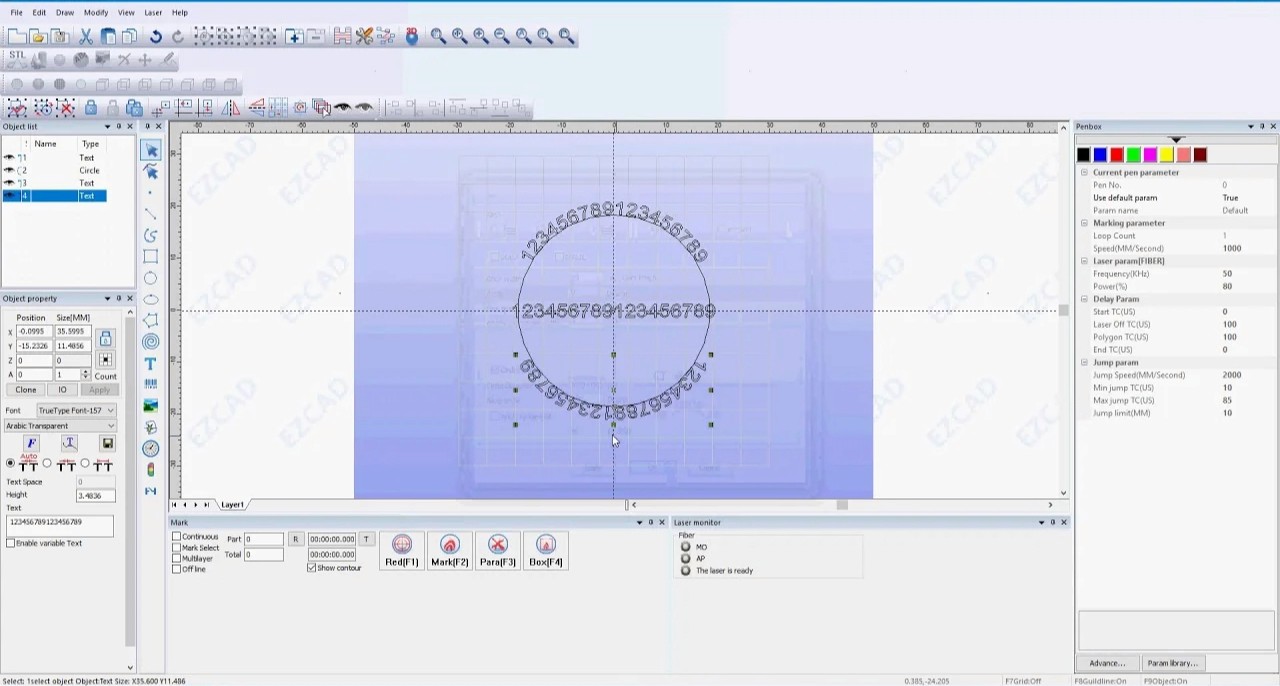
While interviewing laser engraving operators for a previous industrial design project, I heard consistent complaints about these tools: steep learning curves, outdated interfaces that felt like "Windows 98," excessive clicks for basic tasks, and zero mobile accessibility. One jewelry engraver told me: "I've been using EZ CAD for 8 years and I still have to Google how to do certain things."
This presented an opportunity to explore how modern UX/UI principles could improve specialized industrial software—a sector that often lags behind consumer applications in usability innovation. I initiated Nova-Mark as a speculative redesign project to demonstrate what's possible when you apply contemporary interaction design to legacy industrial tools.
Project Details:
Role: Solo UX/UI Designer (speculative project)
Timeline: 7 months (March - Sept 2024)
Scope: User research, competitive analysis, interaction design, high-fidelity prototyping
Deliverables: Interactive Figma prototype, design system, concept video
The Objectives:
Reduce learning curve: Make laser engraving software accessible to beginners while maintaining power-user capabilities
Modernize interaction patterns: Apply contemporary SaaS UX conventions to industrial software
Improve workflow efficiency: Reduce clicks and time required for common tasks
Enable flexibility: Design for both desktop workstations and mobile/tablet devices
I conducted two research phases to understand the problem space:
Phase 1: Contextual Inquiry (8 participants) Visited 3 laser engraving shops and observed operators using EZ CAD and SCAPS in their actual work environments. Participants ranged from a hobbyist engraving personalized gifts to industrial operators marking serial numbers on metal parts. Sessions lasted 45-90 minutes each.
Key observations:
Setup for a new job took 8-12 minutes on average due to navigating nested menus and entering parameters manually
6/8 participants kept handwritten notes or screenshots nearby as reference guides for procedures they performed weekly
All participants expressed frustration with the "clunky" UI but felt locked into these tools because "that's what the laser manufacturer provides"
Mobile access was impossible—users had to be physically at the desktop workstation connected to the laser
Phase 2: Remote Interviews (22 participants) Conducted video interviews with laser engraving operators recruited through industry forums and Facebook groups. Mix of jewelry makers, sign shops, industrial manufacturers, and hobbyists.
Quantitative findings from survey portion:
Average time using current software: 4.2 years
68% rated their software's usability as "poor" or "very poor"
Most frustrating aspects: outdated interface (82%), steep learning curve (73%), lack of templates (64%), poor documentation (59%)
41% had attempted to switch software but returned to EZ CAD/SCAPS due to hardware compatibility
Competitive Analysis
I conducted deep analysis of the two market leaders:
EZ CAD: Dense interface with toolbar-heavy design, parameter settings scattered across multiple dialog boxes, limited undo functionality, no cloud saving or project sharing.
SCAPS: Similar paradigm to EZ CAD, slightly more organized but still relies on 2000s-era Windows UI conventions, better documentation but still technically written.
Adjacent market research: I also examined modern CAD/design tools (Figma, Canva, Fusion 360) to understand how they've solved similar problems around precision editing, templates, and progressive disclosure of complexity.
Design Principles
Based on research insights, I established four core principles:
1. Progressive disclosure: Surface simple controls by default, reveal advanced features only when needed
2. Logical information architecture: Organize interface around the user's mental model (Select → Place → Refine) not the software's technical architecture
3. Visual feedback: Provide real-time preview and clear indication of what will happen before committing actions
4. Reduce cognitive load: Minimize memorization through templates, presets, and contextual help
Information Architecture
I mapped the user's job-to-be-done: "I need to create a design and send it to the laser to be engraved."
Breaking this down revealed a clear three-phase workflow:
Select content: Choose or create the design elements (text, shapes, images)
Position & arrange: Place elements on the virtual workspace/artboard
Configure & execute: Set laser parameters and run the job
Unlike EZ CAD/SCAPS which scatter these functions across menus, I structured Nova-Mark's interface to follow this linear progression.
Interface Layout
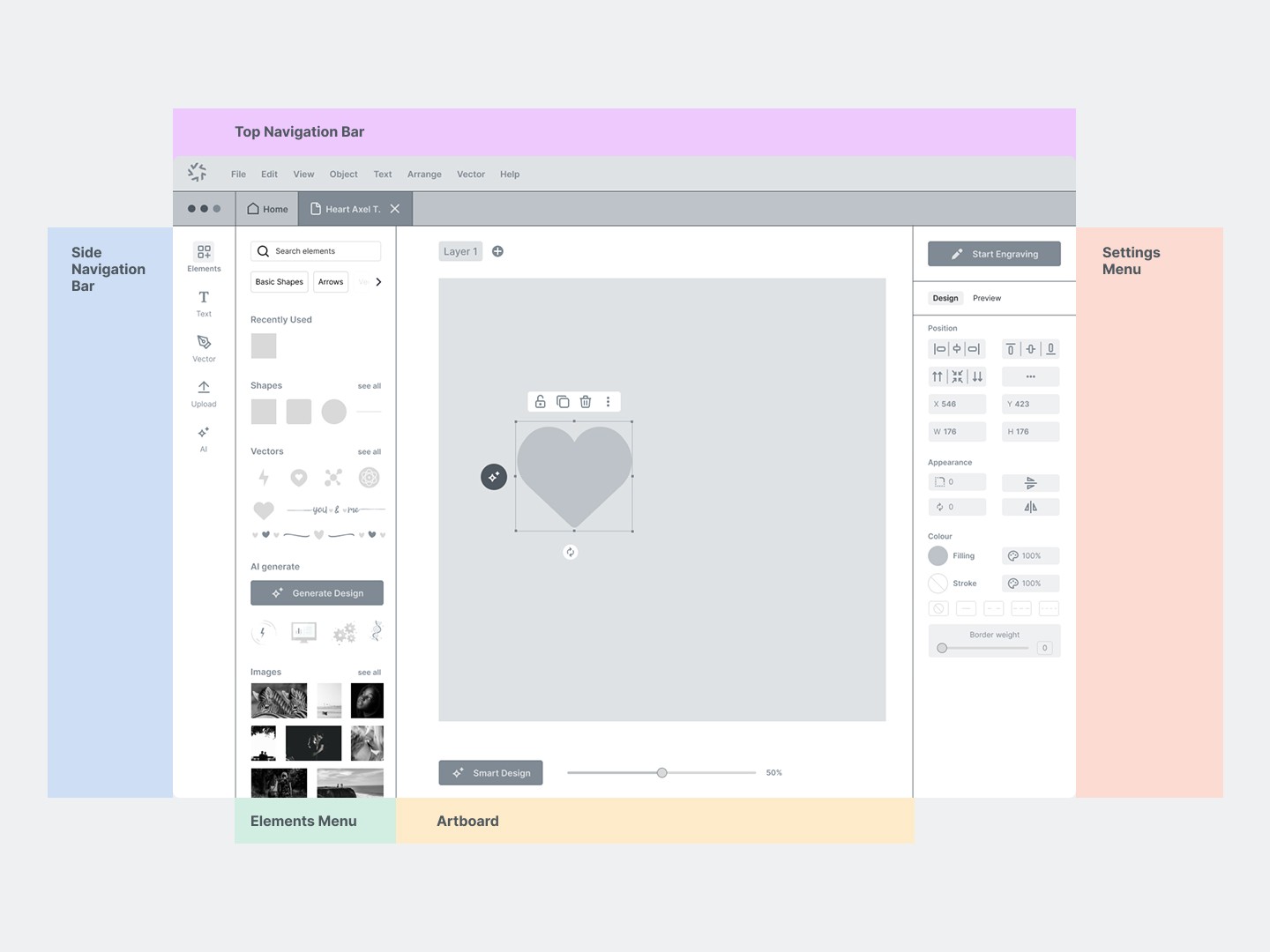
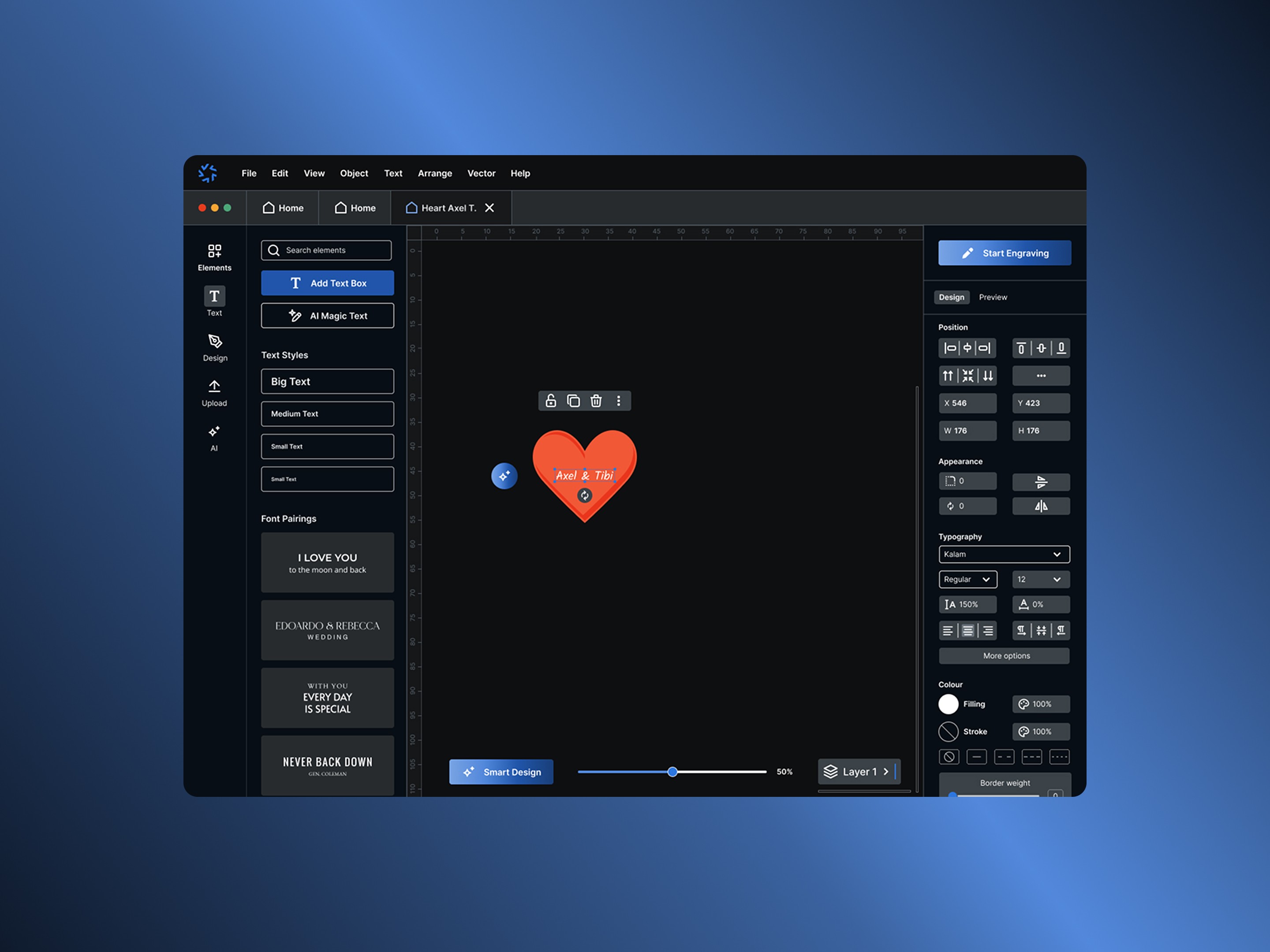
Designed a three-panel layout optimized for the "Select → Place → Refine" workflow:
Left Panel (Select): Contains design tools and asset library
Text tool, shape library, image import, AI generation tool
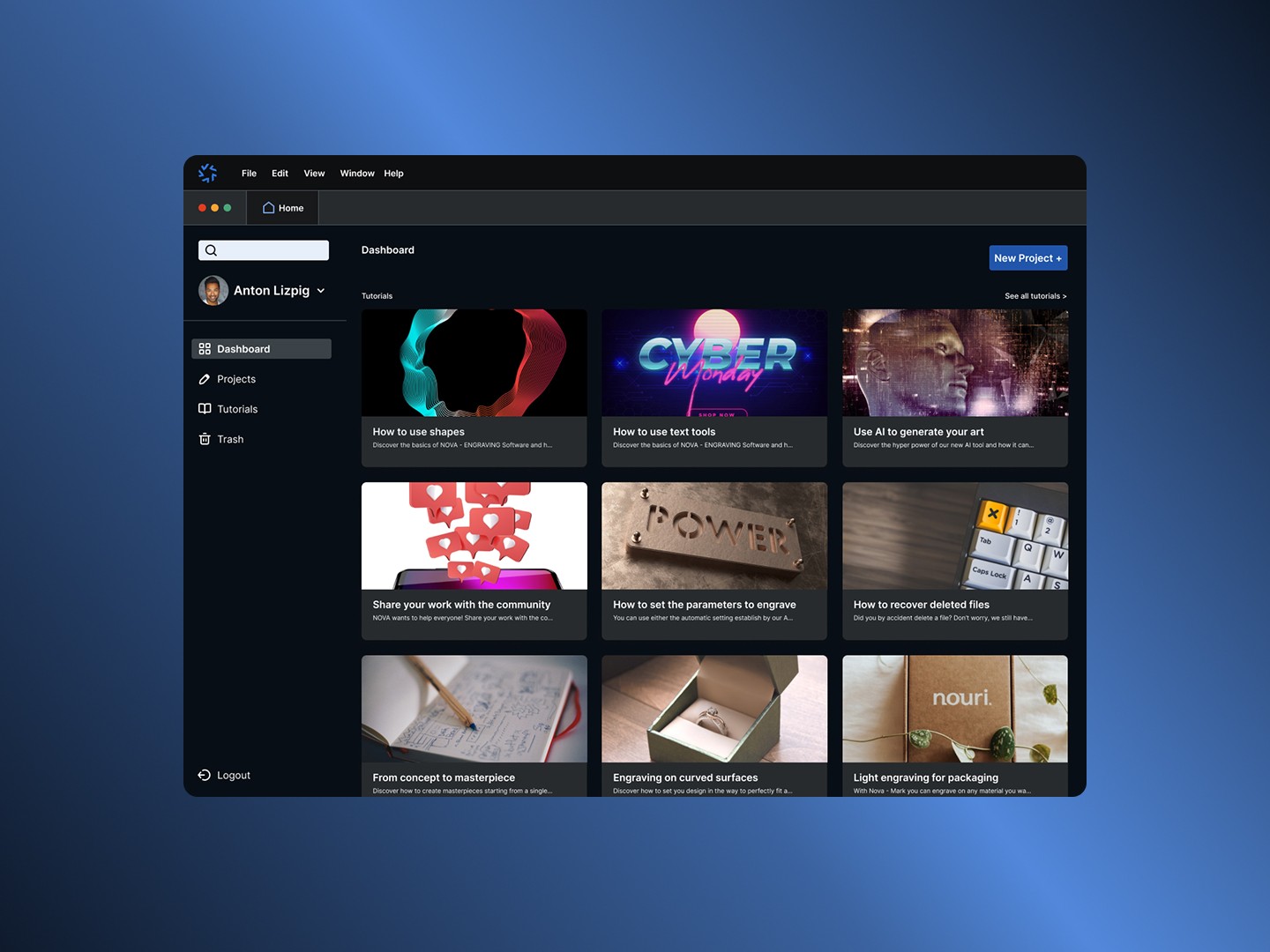
Template gallery organized by use case (jewelry, industrial, signage)
Recent designs for quick reuse
Center Canvas (Place): Large artboard showing 1:1 scale preview
Live camera feed overlay option (if hardware supports it) to see design positioned on actual physical object
Grid and measurement tools for precise placement
Real-time rendering of how the engraving will appear based on material and laser settings
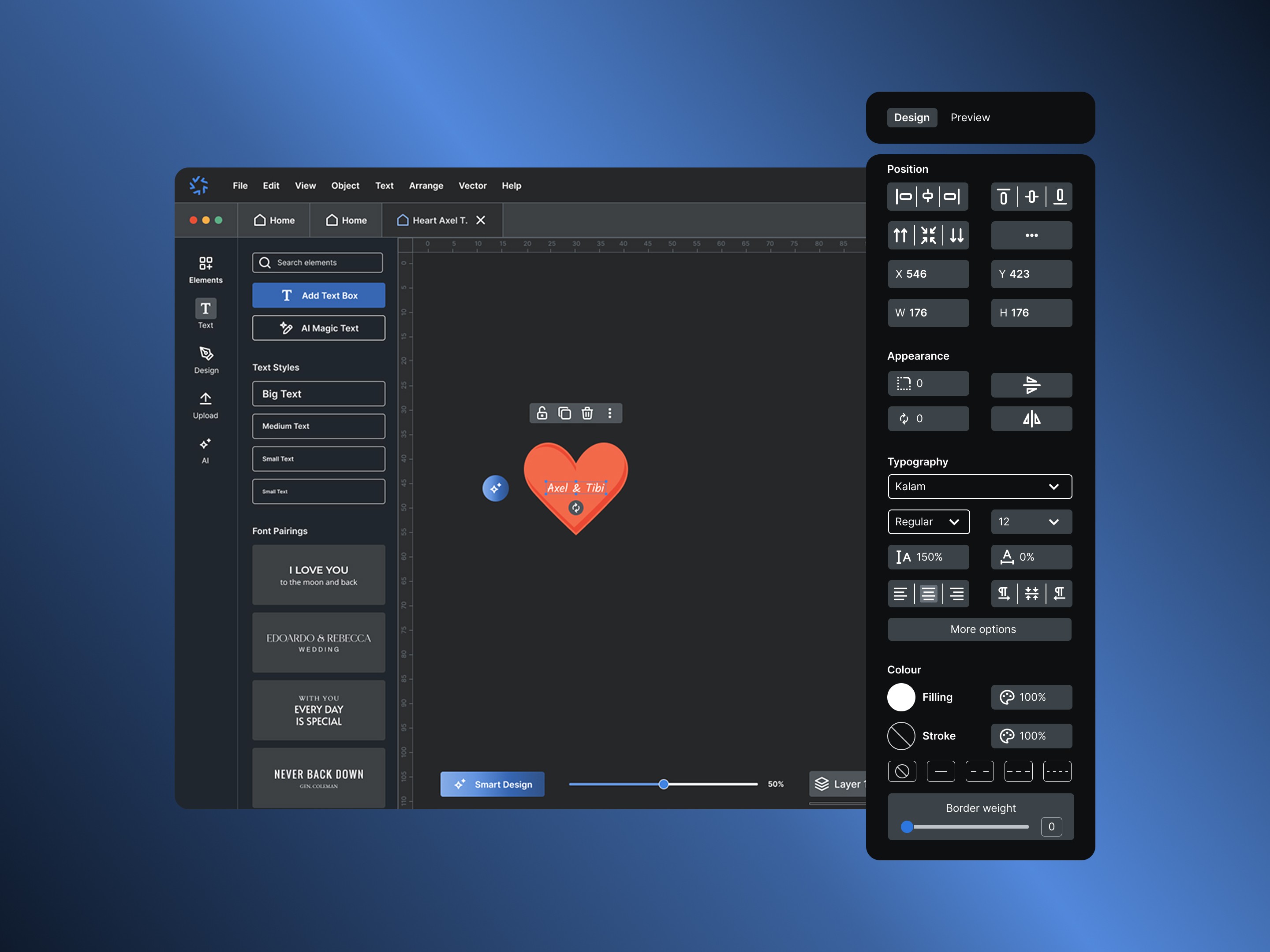
Right Panel (Refine): Context-sensitive settings
Laser power, speed, and frequency controls
Material presets (wood, metal, acrylic, leather, etc.)
Layer management for multi-pass jobs
This spatial organization creates a left-to-right workflow that matches how users naturally approach the task.
Key Feature: AI Design Assistant
One major pain point from research: users often need simple vector graphics but don't have design skills or want to use separate software like Illustrator.
I designed an AI assistant that generates optimized vector graphics from text descriptions:
User types: "create a circular badge with a mountain silhouette"
AI generates 3 variations in seconds
User selects one and it's instantly placed on the canvas as editable vectors
This reduces the barrier to entry for non-designers while maintaining professional output quality. The feature was inspired by similar text-to-image tools but optimized specifically for laser-compatible vector graphics.
Key Feature: Material Intelligence
Rather than forcing users to manually set laser parameters (power, speed, frequency), I designed a material-first approach:
User selects material type from visual library (e.g., "Oak Wood 3mm")
System automatically applies optimal laser settings based on a database of tested configurations
Advanced users can still manually override if needed
Dramatically reduces trial-and-error and material waste for beginners
Key Feature: Template System
Created a comprehensive template library addressing the "steep learning curve" problem:
Templates organized by use case:
Jewelry (rings, pendants, bracelets with common layouts)
Industrial (serial numbers, QR codes, data matrices)
Signage (business signs, nameplates, awards)
Gifts (personalized items, wedding favors)
Each template is fully customizable but provides a strong starting point, allowing beginners to produce professional results immediately.
Visual Design System
Color Palette:
Primary Blue (#2563EB): Trust and professionalism, common in industrial software
Dark Gray (#1E293B): Interface background, reduces eye strain during long sessions
Light Gray (#F1F5F9): Panel backgrounds, creates visual hierarchy
Typography:
Inter for UI elements (excellent screen readability, extensive weight range)
Iconography:
Custom icon set designed for laser engraving context (not generic)
Clear, simple shapes with consistent 2px stroke weight
Designed to work at small sizes (16px minimum)
Created a high-fidelity, interactive Figma prototype demonstrating the complete workflow from opening the app to sending a job to the laser. Tested with 12 participants (mix of experienced EZ CAD users and complete beginners to laser engraving).
Test scenario: "Use this software to create and set up a circular logo engraving on a wooden coaster."
Task success metrics:
11/12 completed the task successfully without assistance
Average time to completion: 3.8 minutes (compared to 8-12 minutes observed with EZ CAD in contextual inquiry)
Zero participants asked "where do I find..." questions—evidence that the information architecture was intuitive
Qualitative feedback:
"This feels like modern software, not something from 2005" (experienced EZ CAD user)
"I understood what to do immediately" (beginner)
"The material presets would save me so much time" (industrial user)
Comparative Testing
For 6 of the 12 prototype testers, I conducted a comparative test: same task in both Nova-Mark (prototype) and EZ CAD (actual software).
Results:
Nova-Mark average completion time: 3.8 minutes
EZ CAD average completion time: 9.2 minutes
6/6 participants stated they would prefer to use Nova-Mark if it were available
When asked to rate ease of use (1-10 scale): Nova-Mark averaged 8.7, EZ CAD averaged 4.2
Design Iterations Based on Testing
Initial prototype testing revealed several improvement areas:
Issue 1: Users didn't notice the camera preview toggle and missed this feature entirely. Solution: Made camera preview more prominent with a larger toggle button and added an onboarding tooltip highlighting the feature.
Issue 2: Advanced users felt the simplified interface might be "too basic" for complex jobs. Solution: Added an "Advanced Mode" toggle that reveals additional parameters and controls. This maintains simplicity for beginners while preserving power-user capabilities.
Issue 3: The AI design assistant sometimes generated results that weren't laser-compatible (too complex, too fine detail). Solution: Added laser-specific constraints to the AI prompt system and a "simplify for engraving" button that reduces detail automatically.